



Antec Three Hundred Two: Stay Cool, Budget Enthusiasts
by Dustin Sklavos on January 24, 2012 7:00 AM EST- Posted in
- Cases/Cooling/PSUs
- Antec
- mid-tower
Introducing the Antec Three Hundred Two
While flagship enclosures are certainly pretty interesting and there are some great deals to be had even just north of $100, competition south of that border is mighty fierce and only becomes more so as manufacturers refresh their lineups with the latest trends and advances in chassis design. We've seen a lot of great options for end users looking to save some scratch, but haven't had a chance to see what Antec can do in this market...until now. Antec is launching their new Three Hundred Two chassis, and if you're an enthusiast on a budget looking for the best cooling you can get without spending up for it, this may be the case for you.
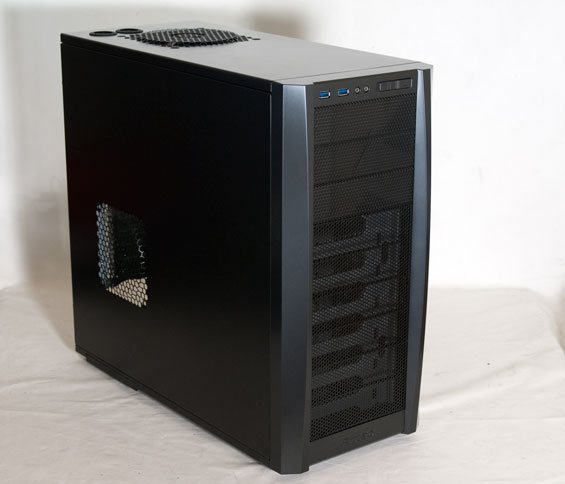
Superficially there doesn't appear to be much that Antec has done to modernize the Three Hundred while keeping the price down, but once you get inside you'll see there's more going on than meets the eye. While the Three Hundred Two is set to be a bit pricier than its predecessor, you'll see there are plenty of good reasons to take the plunge anyhow. Here's the rap sheet:
| Antec Three Hundred Two Specifications | ||
| Motherboard Form Factor | ATX, Micro ATX, Mini ITX | |
| Drive Bays | External | 3x 5.25" |
| Internal | 6x 3.5", 2x 2.5" | |
| Cooling | Front | 2x 120mm fan mount |
| Rear | 1x 120mm Antec TwoCool exhaust fan | |
| Top | 1x 140mm Antec TwoCool exhaust fan | |
| Side | 1x 120mm fan mount; 1x 120mm fan mount behind motherboard tray | |
| Bottom | - | |
| Expansion Slots | 8 | |
| Front I/O Port | 2x USB 3.0, mic and headphone jacks | |
| Top I/O Port | - | |
| Power Supply Size | ATX | |
| Clearance | 12" (Expansion Cards), 170mm (CPU HSF), 200mm (PSU) | |
| Weight | 15.3 lbs (6.9 kg) | |
| Dimensions | 20.2" x 9" x 18.5" (413mm x 229mm x 471mm) | |
| Price | MSRP $79 | |
It's actually kind of unusual to see a case that doesn't support a top-mounted 240mm radiator these days, but when you're dealing with a $79 case it's an omission that shouldn't feel like a major one. Instead Antec gives us an eighth expansion slot, which in my opinion is actually a bit more useful. I know some users are skeptical, but I've personally gotten enough mileage out of eighth slots in cases that I can definitely see their use. Note also that Antec is again using a negative pressure design, but wait until you see the performance numbers.


 Facebook
 Twitter
 RSS
RSS


50 Comments
View All Comments
piroroadkill - Tuesday, January 24, 2012 - link
What's the point? For the one person who has a Zalman Reserator still?That said, nice enough case, but my go-to case is still the Fractal Design Define R3. It just seems to do everything for everybody (as long as your graphics card fits), in a compact size, and sleek P180-esque design.
cjs150 - Thursday, January 26, 2012 - link
I love watercooling my rig but have never used the water cooling holes on any case.Even if I were to use the holes, the positioning on the Antec is just weird. Because the Antec is not too tall you could place a radiator on top of the case with fans actually in the case either pulling cool outside air through the rad and into case or pushing slightly warmer air (not as good but good enough most of the time) from case through radiator and out. Either way you would want the water cooling holes to line up with the inlets on the radiator - and they do not so you would have to mod the top of this case.
Is a bit of a shame because this could be a nice case to use for watercooling with a 240 radiator in front and on top - need to rip top off and remodel though.
I guess I will go back to the Arc Midi
bassetwrangler - Friday, January 27, 2012 - link
As a regretful former owner of a Zalman Reserator, I find it an obvious fantasy that there still exists even one functional example. I dismembered the over complicated carcass of mine, recycling as much as possible, so that it might never reconstitute itself once again into a worthless beeping nightmare.Death666Angel - Saturday, January 28, 2012 - link
I have a Silverstone TJ08-E and had to cut holes in the back myself (used the place above PCI brackets) because I use an external radiator mounted to the side of the case. A lot of people with high-end water cooling use external radiators with 3x3 120mm/140mm fans and need those holes. So there are good reasons for having them and usually they don't bother those who don't need them. However, here they are unfortunately placed very strangely and viewable. :-/doctormonroe - Tuesday, January 24, 2012 - link
I am not a fan of having fan holes behind the motherboard, I used to own a Thermaltake V9, which had such a feature and all it did was allow dust to accumulate on the back of the motherboard.Arbie - Tuesday, January 24, 2012 - link
A case vent behind the motherboard is actually a good idea. Even if you don't put a fan there, it is one of the few places where a simple hole makes sense. Being shielded from the main cavity, it won't let much noise leak out. But air will find its way, and will circulate around much of the mobo perimeter and rear surface to get there.This assumes, of course, that you are running at least a slight positive pressure, which I think is the only sensible thing to do (see other posts). Otherwise you will get dust, as you note.
sajid - Wednesday, January 25, 2012 - link
this is reply to "Fan behind the motherboard tray" by Sajid at 11:41 AMBoogaloo - Tuesday, January 24, 2012 - link
I managed to get an original 300 for $30 through a rebate and sale lining up. Didn't need it at the time but figured cases don't go bad. Then USB 3.0 came out :/Taft12 - Tuesday, January 24, 2012 - link
Cases don't go bad thanks to devices like this!http://www.newegg.ca/Product/Product.aspx?Item=N82...
KineticHummus - Tuesday, January 24, 2012 - link
How can that supply usb 3.0? it uses a usb 2.0 internal connection...