



AOC i2353Ph - IPS for a nice, low price
by Chris Heinonen on January 30, 2012 12:40 AM ESTFirst Impressions, Design, and Specifications
For most people seeking accurate color reproduction and wide viewing angles, IPS has been the screen technology of choice for years now. The main issues against IPS have typically been response time for gamers, a higher black level than VA technologies, and more prominently cost. More and more vendors have been introducing e-IPS displays, which is a more transparent version of IPS that allows for the use of lower powered backlights, lowering the cost to consumers. The tradeoff is that this does have a negative effect on contrast shifts in the panel when viewed at an angle, though color shifts still are not present.
The other change is that many of these e-IPS panels have actually been 6-bit panels with Advanced Frame Rate Control. Much like a TN panel, it can’t produce a full 8-bits of dynamic range for each color and instead for shades that it cannot produce it will cycle between two different shades that would result in the desired shade. For some people this effect isn’t visible and they will gladly take the benefits of IPS for this side effect, but for graphics professionals the lack of true color resolution makes it a side effect they can’t live with.
There was a bit of chatter this past fall when AOC introduced the i2353 display, which is an LED backlit IPS panel with an MSRP under $200. Had the prices of IPS panels and components finally fallen to the point where they would be able to start forcing companies to transition to them away from TN for their affordable monitor lines? To find out if the AOC monitor was still able to offer a good level of performance at this price point we requested a review sample, which they quickly provided.
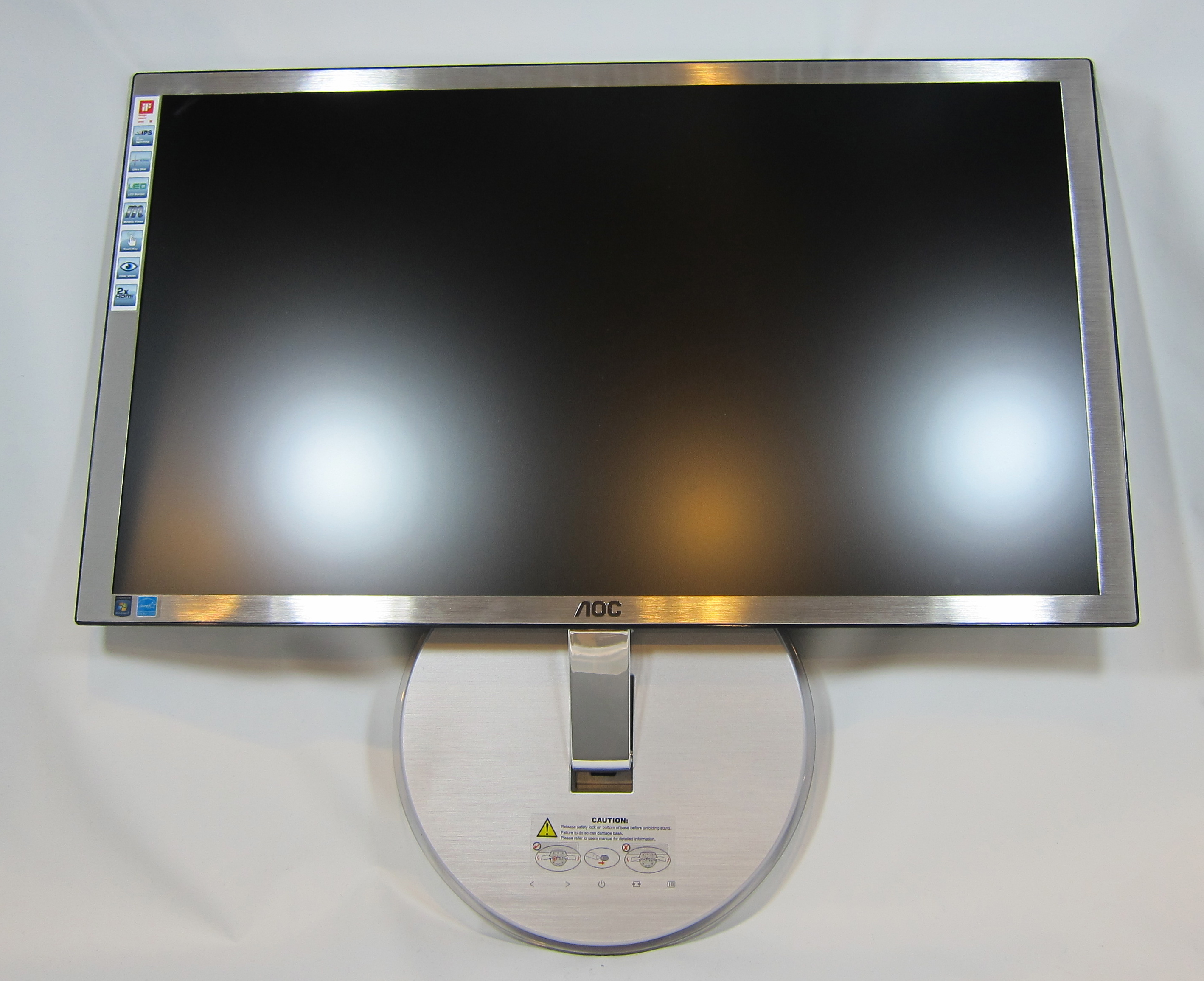
Once the AOC was unpacked from its box and upright on its integrated stand, I have to say I thought it looked pretty good. They’ve used the LED backlighting to create a very nice, thin display with a plastic trim that looks like brushed aluminum. The integrated stand contains a Dsub input, dual HDMI inputs, and a headphone output. At first I couldn’t even see the buttons for power and the OSD, which are barely labeled on top of the base, but I eventually located them. The feeling of the buttons is not really one of high quality, as you seem to need to press in on the entire base to trigger them, but they were responsive overall.
The downside to this setup is the lack of flexibility in ergonomic adjustments, as well as mounting options. The integrated base offers only a tilt control for the display, and that itself is very tight and hard to adjust. This integrated base also means that there are no VESA mounting holes on the display itself. There are your standard 100mm VEGA holes on the bottom of the base, and as you can fold it to lay perfectly flat with the monitor, this would allow you to still mount it to the wall; however, it would still make an aftermarket stand with height and other adjustments an impossibility.
A welcome touch is that both the bezel and screen are a matte finish so I had no real issues with glare from the lights in my room. The very edge of the bezel does reflect a bit of light, but overall it was much better than many other monitors. On the whole, I really liked the design of the AOC as it looked very nice on my desk, and the level of adjustment was in line with other models in the price range. From a purely superficial perspective, the AOC looks like a good choice for a mainstream LCD.


| AOC i2353Ph | |
| Video Inputs | 1x Dsub, 2X HDMI |
| Panel Type | eIPS, 6-bit + AFRC |
| Pixel Pitch | 0.265mm |
| Colors | 16.7 million |
| Brightness | 250 nits |
| Contrast Ratio | 1000:1 |
| Response Time | 5ms GTG |
| Viewable Size | 23" |
| Resolution | 1920x1080 |
| Viewing Angle | 178 H/178 V |
| Backlight | LED |
| Power Consumption (operation) | 45 Watts Maximum |
| Power Consumption (standby) | 0.1 Watt |
| Screen Treatment | Matte |
| Height-Adjustable | No |
| Tilt | Yes (-4 to 14 degrees) |
| Pivot | No |
| Swivel | No |
| VESA Wall Mounting | Yes |
| Dimensions w/ Base (WxHxD) | 21.6" x 15.3" x 7.3" |
| Weight | 5.5 lbs. |
| Additional Features | Headphone Jack, 2 x 2W speakers |
| Limited Warranty | 3 Years |
| Accessories | VGA cable, PSU and power cable, CD with drivers and software |
| Price | Online for $190 (as of 1/24/2012) |
Viewing angles were also good on the AOC as you can see in the gallery below. At the very edges you start to lose some contrast, but colors remain very good and no one is likely to work at the angles where those shifts start to appear anyway.


 Facebook
 Twitter
 RSS
RSS


71 Comments
View All Comments
cashkennedy - Monday, January 30, 2012 - link
Might want to clarify that its too much lag for FPS gaming, as Im pretty sure a latency that small in an RPG or strategy game is not going to have any effect.Jedi2155 - Monday, January 30, 2012 - link
Where did you get the idea that 5ms GTG response time is too much for gaming? The more important consideration IMO is input lag.mathew7 - Monday, January 30, 2012 - link
He said "The lag is a little bit too high for hard core gamers". He measured it at 16ms delay compared to CRT. This is not pixel response that every manufacturer wants and declares it low. Input lag is not specified by manufacturers, and only some reviews (this included) actually measure it.As for categories, FPS is not the only category that benefits from low lag. Racing is another and I'm not talking about the NFS series where a mistake slows you down a bit (in Underground 2 a friend of mine managed to win once by riding each wall in each turn), but where a mistake ends your race (sims).
Samus - Monday, January 30, 2012 - link
Still no reason to replace my $400 Doublesight DS-2700W 27" PVASabresiberian - Monday, January 30, 2012 - link
Umm - who suggested it would be?therealnickdanger - Monday, January 30, 2012 - link
No one, he just wanted to brag.jleach1 - Tuesday, January 31, 2012 - link
Back in the grand turismo days, you used to be able to buy a super car, change the transmission tuning to all acceleration, and the tape the controller stick to ride the wall for Le Mans races.Those were the days... (feeling nostalgic here...not to cheat.)
JonnyDough - Monday, January 30, 2012 - link
I for one, think that 5ms is too slow for gaming. I won't buy a monitor for a gaming system over 3ms, 2 is preferred. Even some movies can show some ghosting at 5ms. I can tell the difference.jleach1 - Tuesday, January 31, 2012 - link
I haven't seen a display with that low of lag. The value of a manufacturers advertised display lag is a joke at best.aguilpa1 - Tuesday, January 31, 2012 - link
I have 3 120Hz Alienware OPTX2310's with rated 3ms refresh rates. It is true that the way manufacture's measure those rates is less then accurate but since it is true of all monitors it is still a good idea if your gaming to get the fastest timings even if it turns out to be more like 5 or 6ms on a 3ms rated overall. You can tell the difference. Also I believe the 2310's even have a better gamma (mid 70's) then this AOC does which is very disappointing for an IPS panel.